Scrape News website using Scrapy
How I scraped 5,50,000 Odia news articles

Abstract
To feed data-hungry NLP models of recent times, I have scraped 5,50,000+ news articles from their websites which constitute an average of 50 lakhs sentences and 2 crores plus words of Monolingual Odia corpus. The dataset consists of a header and corresponding article content. In this blog post, I described why and how I had able to do this and how can we improve it further to extract more meaningful data.
Introduction
- Odia being a vocabulary rich (ଶବ୍ଦକୋଷ ସମୃଦ୍ଧ) language, has very little presence over the internet to feed the data-hungry giants of the latest developments in NLP.
- There has been a constant demand for Odia corpus for these NLP tasks.
- After the demand from various forums, the news publisher of Odisha upgraded themselves from uploading only e-papers (physical newspaper scan) to writing actual articles of news in Odia Unicode format on their websites.
- Almost all the major Odia news agencies have been posting articles over the internet since 2019.
- Therefore, I believed in two years enough data should have been there for me to extract to build a large corpus (ଭଣ୍ଡାର).
Planning and analysis
Challenges
Reduce the housekeeping tasks
- Earlier I had written a Wikipedia parser to get data from Odia Wikipedia while using Beautifulsoup python library.
- However, that involves many housekeeping tasks like building your own POST requests, sleeping in case of failure/rate-limiting and not being scalable.
- I need to develop something easily without many maintenance tasks to keep track of.
Make it beginner-friendly and as simple as possible
- How can I leverage the existing open-source library/framework to make it easy for beginners?
- Just give only the minimum fields like where to crawl, what to scrape and what to store and it should handle the rest.
Possible Solutions
In the quest of resolving the above problems I scouted over the following libraries:
Why did I choose Scrapy
Scrapy was on my radar for at least a couple of years. Due to procrastination, I was able to learn it. Finally, On this November, I was able to get my hand around it.
Pros of Scrapy
- It is a full framed framework, built for a single purpose and it does that well i.e. crawl and extracts data from the websites.
- It has ready-made features developed and no need to build from scratch.
- It has support for rate limiting, proxy handling, user agent configuration, crawling and scraping based on expressions like XPath, CSS and HTML support.
- Fast and Asynchronous, built on top of Twisted web framework.
Cons of scrapy
- As it is a framework like Django, there is a learning curve initially and not so beginner-friendly. There are specific ways to do things around and particular places.
- However, there are good tutorials available online for free to get around with Scrapy. A few tutorials I have mentioned at the end of this article.
How did I do this?
I have explained in a deep dive video, how I did it, you can refer to it.
Disclaimer: this video is in Odia language.
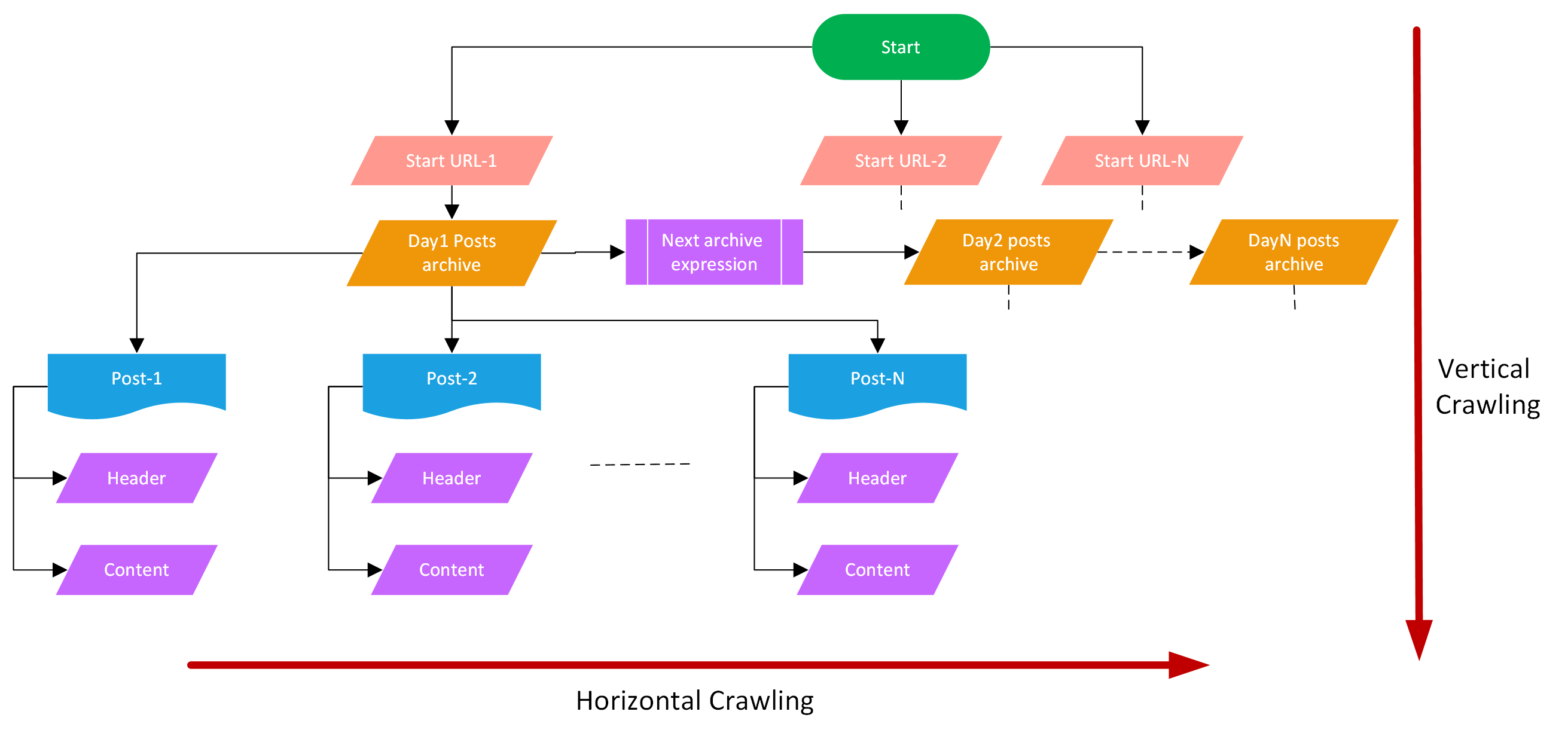
Start URL
- A root/parent/base URL also called a start URL is used as the starting from where all the further URLs will be crawled.
- There can be single or multiple start URLs.
Here is an example of the start URLs of the Sambad website.
def fetch_start_urls():
    start_date = date(2017, 9, 19)  # date from which sambad website started posting
    end_date = date.today()  # current date
    delta = timedelta(days=1) # getting the archive pages, one day at a time
    urls = []

    # Iterate though all the days starting from start date to today
    while start_date <= end_date:
        urls += [f"https://sambad.in/date/{start_date.strftime('%Y/%m/%d')}"]
        start_date += delta
    return urls
Broadly, there are two XPath expressions used:
- Horizontal Crawling
- Vertical Crawling
Horizontal Crawling
- In horizontal crawling, the pages of websites scrolled which are at the same level like the everyday archival of the posts for e.g. 31st December posts page, 30th December posts page.
- On this page, all the news posts made on that day have been linked.
- Scrapy crawls through all these days' archives i.e. called horizontal crawling.
- Horizontal crawling also involves crawling through all pages of a daily archive post by clicking on the Next button.
Rule(LinkExtractor(restrict_xpaths="//a[@class='btn-bs-pagination next']"), follow=True)
- The first rule is about the horizontal crawling browsing through all the websites in a day's archive by clicking through the
ପରବର୍ତ୍ତୀ ପୃଷ୍ଠା(next) button. - You can check this web page for the 4th December's archive page
follow=Truemeans crawl through the link and process it in the same Spider logic.
Vertical crawling
- In vertical crawling, we go inside the posts start the website start URL and then inside the daily archive posts followed by the individual article links.
- We go deeper inside pages crawling through links inside links.
Rule(LinkExtractor(restrict_xpaths="//a[@class='post-title post-url']"), follow=True, callback='parse_item')
- In this rule, we direct the spider to fetch the URL of the XPath element and parse that link as mentioned in the function,
parse_item. - This is vertical crawling into individual posts from the daily archive post page.
Extract fields from the page:
    def parse_item(self, response):
        l = ItemLoader(item=ScrapeprojectItem(), response=response)
        # Load fields using XPath expressions
        l.add_xpath('header', "//h1[@class='single-post-title']//text()",
                    MapCompose(lambda text: text.strip()), Join())
        l.add_xpath('content', "//div[@class='entry-content clearfix single-post-content']//text()",
                    MapCompose(lambda text: text.strip()), Join())
        return l.load_item()
There are two fields specifically I have extracted from the articles
- Header
- Content
There are two expressions provided one for the header and another for the content.
MapComposedo the post-processing after extracting text from the website.- Here MapCompose removes additional spaces and new line characters from the extracted field and join the final result into a single string of the list.
You can see the full spider written for Sambad website here:
from scrapy.linkextractors import LinkExtractor
from scrapy.loader import ItemLoader
from scrapy.loader.processors import MapCompose, Join
from scrapy.spiders import CrawlSpider, Rule

from scrapeProject.items import ScrapeprojectItem
from datetime import date, timedelta


def fetch_start_urls():
    start_date = date(2017, 9, 19)
    end_date = date.today()
    delta = timedelta(days=1)
    urls = []
    while start_date <= end_date:
        urls += [f"https://sambad.in/date/{start_date.strftime('%Y/%m/%d')}"]
        start_date += delta
    return urls


class SambadSpider(CrawlSpider):
    name = 'sambad'
    start_urls = fetch_start_urls()

    rules = (
        Rule(LinkExtractor(restrict_xpaths="//a[@class='btn-bs-pagination next']"), follow=True),
        Rule(LinkExtractor(restrict_xpaths="//a[@class='post-title post-url']"), follow=True, callback='parse_item'),
    )

    def parse_item(self, response):
        l = ItemLoader(item=ScrapeprojectItem(), response=response)
        # Load fields using XPath expressions
        l.add_xpath('header', "//h1[@class='single-post-title']//text()",
                    MapCompose(lambda text: text.strip()), Join())
        l.add_xpath('content', "//div[@class='entry-content clearfix single-post-content']//text()",
                    MapCompose(lambda text: text.strip()), Join())
        return l.load_item()
The full source code can be found here: https://bit.ly/OdiaNLPSambad
Data scraped
News website and corresponding articles data extracted
| Website | # of Articles | Size |
| Sambad | 2,38,680 | 947 MB |
| Dharitri | 1,21,368 | 388.2 MB |
| Samaja | 1,02,671 | 356.7 MB |
| Prameya | 70,918 | 270.7 MB |
| Pragativadi | 12,987 | 36.1 MB |
| Samaya | 3,220 | 8.6 MB |
- The datasets are in Kaggle.
Sample Article
{"header": [" ରଥଖଳାରେ ନିର୍ମାଣ ହେବ ରଥ; ଯାତ୍ରା ନିଷ୍ପତ୍ତି ନେବେ ରାଜ୍ୟସରକାର"], "content": [" Edited by Papu Mohanty ଭୁବନେଶ୍ୱର, (ସବୁ୍ୟ): 07/05:ରଥ ନିର୍ମାଣ ନେଇ କେନ୍ଦ୍ରସରକାର ରାଜ୍ୟକୁ ଦେଇଛନ୍ତି ସବୁଜ ସଙ୍କେତ । ଏ ସମ୍ପର୍କରେ କେନ୍ଦ୍ର ଗୃହମନ୍ତ୍ରଣାଳୟ ପକ୍ଷରୁ ଓଡିଶା ମୁଖ୍ୟ ସଚିବଙ୍କୁ ଚିଠି ଲେଖି ଅନୁମତି ପ୍ରଦାନ ସମ୍ପର୍କରେ ଜଣାଇଦିଆଯାଇଛି । ତେବେ ଏହି ଅନୁମତି ସର୍ତମୂଳକ । ଗୃହମନ୍ତ୍ରଣାଳୟର ସର୍ତ୍ତ ଅନୁସାରେ ରଥଖଳାରେ ରଥ ନିର୍ମାଣ କାର୍ଯ୍ୟ କରାଯିବ ତେବେ ସେଠାରେ କୌଣସି ଧାର୍ମିକ ଏକତ୍ରୀ କରଣ ହୋଇପାରିବନି । ସାମାଜି ଦୂରତାର କଡା ଅନୁପାଳନ ହେବ । ଲକ୍ଡାଉନ୍ ସର୍ମ୍ପକିତ ସମସ୍ଥ ଗାଇଡ୍ଲାଇନକୁ କଡାକଡି ଭାବେ ପାଳନ କରାଯିବ । ସୂଚନାଯୋଗ୍ୟ ଯେ ରଥଯାତ୍ରା ପାଇଁ ରାଜ୍ୟ ସରକାର କେନ୍ଦ୍ରକୁ ଅନୁମତି ମାଗିଥିଲେ । ତେବେ ରଥ ନିର୍ମାଣ ପାଇଁ କେନ୍ଦ୍ର ସବୁଜ ସଙ୍କେତ ଦେଇଥିଲେ ମଧ୍ୟ ରଥଯାତ୍ରା ହେବକି ନାହିଁ ତାହାର ନିଷ୍ପତ୍ତି ରାଜ୍ୟସରକାରଙ୍କ ଉପରେ ଛାଡିଦେଇଛନ୍ତି । ରଥଯାତ୍ରା ହେବକିନାହିଁ ସେତେବେଳର ସ୍ଥିତିକୁ ଆକଳନ କରି ଯାହା ନିଷ୍ପତ୍ତି ରାଜ୍ୟସରକାର ନେବେବୋଲି କୁହାଯାଇଛି । "]}
Future scopes
- Utilization of the Monolingual Corpus for
- Sentence auto-completion
- Masked token prediction
- Text Classification
- Question and Answering
- Freelancing experience gain
Scrapy Tutorials
Text-based
Video-based
Conclusion
In this article, I have described how I chose scrapy as the data scraping framework to extract monolingual corpus from Odia news websites. I have described how using XPath we can do vertical and horizontal crawling of websites. I have described how can we fetch specific fields from a website by crawling through its web pages. These data can help further improve the computational linguistic capabilities of the Odia language.
Further References
If you find this article useful, please cite this using:
@misc{Soumendrak,
    author       = {Soumendra Kumar Sahoo},
    title        = {Odia Monolingual field based extraction},
    howpublished = {\url{https://www.blog.soumendrak.com/}},
    year         = {2021}
}


